The short answer
ChatGPT recommends businesses it can read about clearly and consistently in more than one place: your website, your Google and Bing listings, your LinkedIn, your reviews and what other people say about you. To show up, describe what you do, who for and where in plain words, use the same details everywhere, and get mentioned beyond your own channels. None of it needs an ad budget or an agency, so it works for a small business, a founder-led business or a freelancer working on their own. Since November 2026, UK businesses with a website can also claim their profile in ChatGPT, so the profile people click through to describes you in your own words.
Why it's worth your time now
More of your customers are asking AI instead of searching. In BrightLocal's 2026 survey of 1,002 US consumers, 45% had used AI tools such as ChatGPT to find local business recommendations, up from 6% a year earlier. That puts AI behind only Google and Facebook as a place people look for a local business.
The survey is American, and I haven't seen a UK study like it yet, but the direction is clear. When someone asks ChatGPT for a good bookkeeper in Leeds, a florist in Wakefield or a freelance copywriter who knows the care sector, it names a handful of businesses and people. If you're not one of them, that customer may never get as far as your website.
How does ChatGPT decide which businesses to mention?
OpenAI explains that ChatGPT search rewrites your question into one or more targeted searches, and sometimes works with other search providers to run them. It also has its own crawler, OAI-SearchBot, which reads websites so they can appear in ChatGPT's search results. OpenAI is clear that there's no way to guarantee top placement.
In practice, ChatGPT puts its answer together from what it can find about you across the web: your own website, your business listings, your reviews, and other sites that mention you. The clearer and more consistent that picture is, the more confident it can be about naming you.
Five things that help ChatGPT recommend you
1. Say what you do in one plain sentence
Near the top of your website, write one sentence that says what you do, who for and where: "[Your business] is a [service] in [town] for [who you help]." AI tools lift sentences like that almost word for word. If you freelance under your own name, write it the same way: "I'm a freelance [service] for [who you help], based in [town]." Then use the same sentence on your Google profile, your Bing listing, your LinkedIn and your ChatGPT business profile. If you're not sure yet who you're for, that's what the Strategy Week works out.
2. Get listed on Bing Places as well as Google
OpenAI doesn't publish a list of its search partners, but Bing is widely reported to be one of them, and many small businesses have never claimed a Bing listing. Bing Places lets you import your Google Business Profile, and Microsoft made that import simpler in 2025. Import it, check every detail, and verify the listing. It takes about half an hour. If you work from home, you can usually hide your address and list the areas you serve instead.
3. Use the same details everywhere
Your business name, town, phone number and description should match on your website, Google, Bing, LinkedIn and any directories you're listed in. Three slightly different versions of you confuse people, and they make it harder for an AI tool to be sure it's found the right business.
4. Add an FAQ to your website, and let OpenAI's crawler in
List the questions clients ask you on calls, and answer each one in two to four sentences. That gives ChatGPT clear, quotable answers about your business in your own words. While you're there, ask whoever looks after your website to check that it doesn't block OAI-SearchBot. OpenAI asks site owners to allow it, because a site it can't read is a site it can't recommend.
5. Get mentioned beyond your own channels
AI tools pay attention to what other people say about you. Ask happy clients for Google reviews, and reply to every one. Get listed on a partner's or supplier's website, say yes to the local podcast, write for your business network's newsletter, and make sure your local chamber or networking group lists you. Each mention is one more place where the same clear story about your business can be found.
In a founder-led business or as a freelancer, people often look you up by your own name rather than the business's, so make sure the two appear together wherever you're mentioned, the way I write "Jitka Lopez, founder of Marketiva".
All five are free. Give them a couple of afternoons, and ask someone to check they're done right. If you'd like someone to work through them with you, weeks two and three of Found & Chosen cover your Google and Bing listings, your website and your LinkedIn.
UK businesses can now claim their profile in ChatGPT
Since 10 November 2026, OpenAI lets businesses claim their profile in ChatGPT through Business Hub, and it's free. In the UK, freelancers, consultants, founder-led and small businesses that sell online and have a website can claim theirs, or add it if ChatGPT doesn't list them yet. Shops, salons and cafés tied to a premises can only claim an existing US listing for now.
Claiming helps with everything above. You write your own description, add your logo and website, and get a blue check that tells people the profile is run by the business. OpenAI is clear it doesn't guarantee more recommendations, so think of it as one more place where ChatGPT reads the same clear story about you, written by you. After I added Marketiva's description, ChatGPT's answer to "Who is Marketiva?" followed it.
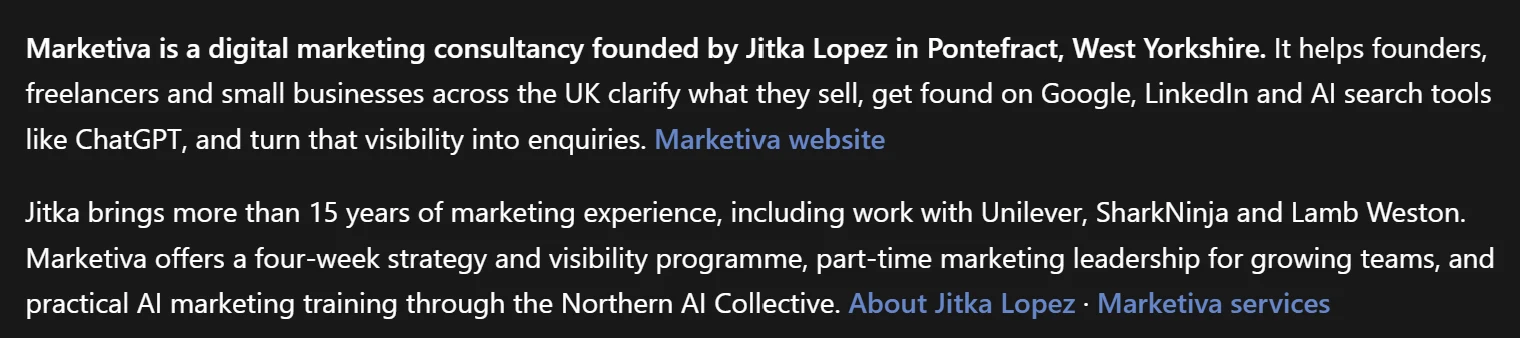
You'll also see how often ChatGPT mentions you and what it thinks you're about. My guide on how to claim your business on ChatGPT covers what you need before you start, the six steps and what the insights tell you.
How long does it take to show up?
Changes to your website and listings go live straight away, and a new Bing listing needs verifying before it appears. ChatGPT picking up the new picture of your business takes longer, and there's no fixed timetable. That's why I check monthly rather than daily, and why it's worth starting now.
How to check what ChatGPT says about you
Open a new chat, ideally a temporary one so your history doesn't colour the answer, and ask:
- "What does [your business name] do?"
- "Who's a good [your service] in [your town]?"
- "Can you recommend a freelance [your service] for [your type of client]?"
- "What do people say about [your business name]?"
Check whether the answers are correct, whether you're named, and what ChatGPT gets wrong. Write the answers down with the date, so you can compare them next month. Try the same questions in Gemini and Perplexity too, because each tool finds different sources. Once you've claimed your profile, Business Hub adds the numbers: how often ChatGPT mentions you and the topics it links you with.
More questions about getting found? The getting-found FAQ on the homepage answers the ones I hear most, and the other guides are on the Guides page.
Jitka Lopez
Getting businesses found has been part of my job for 15+ years, from multi-market website migrations for Unilever's beauty brands across Asia to international SEO on Baidu, Yandex and Naver. AI search is the newest version of the same job, and the basics haven't changed much: say clearly what you do, be consistent, and be talked about.
If you'd like to set all of this up properly with someone checking your work, Found & Chosen covers it in four weeks. If you'd rather learn it yourself alongside other founders, join the Northern AI Collective.
Sources
- OpenAI Help Center, ChatGPT search: how search queries are run, OAI-SearchBot, and placement.
- BrightLocal, Local Consumer Review Survey 2026: 1,002 US consumers, published February 2026.
- Microsoft Bing Blog, Introducing the new Bing Places for Business, October 2025.